Why Choose Us?

HIPAA

HIPAA-Compliant Ambient Documentation

Encryption

End-to-end Encryption

Audit

Complete Audit Logging

Integration

Seamlessly Integrated with HARRIS CareTracker EHR

Documentation is Stealing Hours you will Never Recover

Twenty minute patient visit. You understand the problem. You know the diagnosis. You explained the treatment plan. Patient leaves satisfied.

Now the real work begins. Click through templates. Type history of present illness. Document review of systems. Enter physical exam findings. Update problem list. Order medications. Generate assessment and plan. Twenty minutes of care requires thirty minutes of typing.

Every hour spent typing after visits is an hour stolen from your life. Patients deserve your attention during encounters. You deserves your time after work ends. Documentation should not consume both.

Amplify from HARRIS CareTracker eliminates this theft. AI captures patient conversations in real time. Transcription happens automatically. Clinical summaries generate in seconds. Review takes minutes instead of hours. Documentation finishes before the next patient arrives. Your day ends when your last patient leaves.

amplify ambient listening

What Amplify is and How it Transforms your Workflow

Amplify is an AI powered ambient documentation system that integrates directly with HARRIS CareTracker EHR. Unlike standalone recorders requiring separate file management, Amplify operates as encounter driven documentation starting from your scheduled appointments.

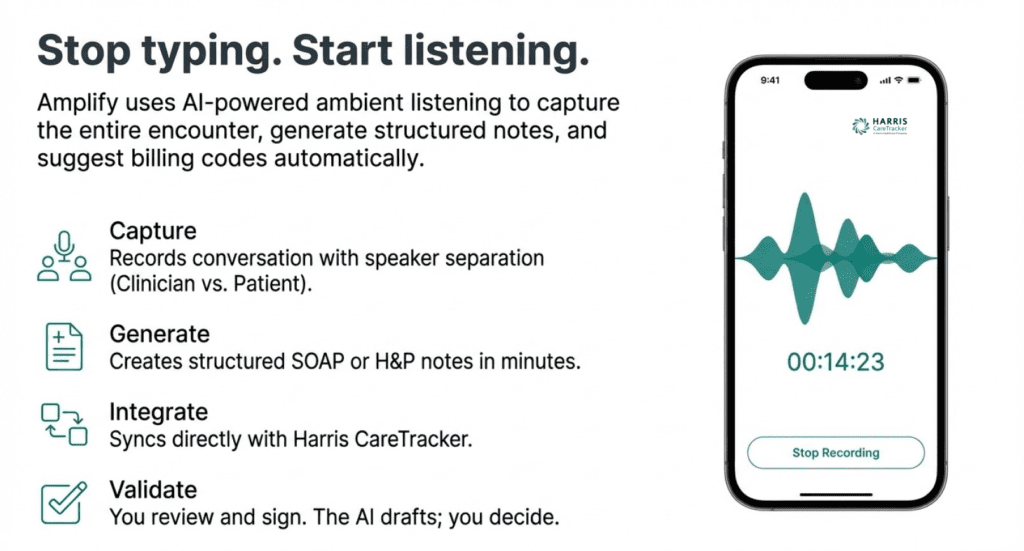
Patient appointments sync automatically from your practice management system. When the patient arrives, you start recording. AI listens to the conversation. Speaker identification separates your voice from the patient’s voice. Medical terminology recognition handles clinical vocabulary accurately.

After the visit ends, transcription completes within minutes. AI organizes the conversation into structured clinical summary with ten standard sections. You review the summary, fill any gaps using quick dictation, and generate a complete note in SOAP or History and Physical format. Sign digitally. Done.

The entire process from patient exit to signed note completes in five to ten minutes instead of twenty to thirty minutes of traditional typing.

Workflow

EHR integration eliminating workflow disruption

Amplify connects directly with HARRIS CareTracker through secure API integration. This connection means encounters flow automatically from scheduling into your documentation workflow.

What synchronizes automatically:

Patient name, date of birth, medical record number, scheduled visit date and time, visit type, appointment location, chief complaint when documented during scheduling, and assigned provider all populate without manual entry.

Patient contact information stays encrypted and never displays in the recording interface protecting privacy during documentation workflow.

Provider matching intelligence:

System uses provider ID from EHR to route encounters correctly. Your encounters appear in your list automatically. Colleagues see their encounters. Administrators can manually assign unmatched encounters when needed.

Workflow status tracking:

Encounter dashboard shows today’s appointments, upcoming visits, and recent encounters. Each shows documentation status including Ready, Recording, Transcribing, Validation in Progress, Note Ready, Note Generated, and Signed. You always know which patients need documentation attention.

Integration eliminates the platform switching and file management plaguing standalone ambient recorders. Everything happens within your existing EHR workflow.

Ambient listening recording

Recording that works everywhere you practice

High quality audio recording works on both web browsers and mobile devices. Record in exam rooms using computer or tablet. Capture telehealth visits through same interface. Switch devices without changing workflow.

Recording interface features:

Timer showing recording duration confirms capture is active. Audio visualization waveform provides real time feedback that sound is recording correctly. Pause, stop, and cancel controls give you complete control over what gets captured.

After stopping, secure upload begins automatically. Transcription starts immediately. Clinical summary generation proceeds in background. You can navigate away to see next patient. Processing continues without requiring you to wait.

In person and telehealth support:

Position microphone to capture both your voice and patient responses during office visits. Use headset microphone during telehealth encounters to improve audio quality and speaker separation. Same recording workflow applies regardless of visit modality.

Connectivity resilience:

Recording continues locally if internet connection drops temporarily. Upload occurs automatically when connectivity restores. No data loss from network interruptions.

AI that Understands Medical Conversations

General purpose transcription tools struggle with medical terminology, drug names, and clinical abbreviations. Amplify transcription is trained specifically for healthcare conversations. CPT codes transcribe correctly. Medication names capture accurately. Specialty vocabulary converts without errors.

Speaker Identification without Manual Labeling

AI automatically distinguishes your clinical assessment from patient history and concerns through speaker diarization technology. Transcript shows who said what without requiring you to identify speakers during or after recording.

How speaker separation improves documentation:

Patient reported symptoms organize into subjective section. Your clinical observations populate objective findings. Diagnostic reasoning separates from patient questions. Treatment plan discussion captures clearly. Clinical summary generation uses speaker context to place information in appropriate note sections.

Accuracy across visit types:

Primary care encounters with conversational history taking. Specialty consultations with technical discussions. Follow up visits reviewing prior treatments. New patient comprehensive evaluations. Mental health sessions with extended dialogue. All benefit from accurate speaker identification.

Medical Terminology and Entity Extraction

Transcription accuracy optimizes for clinical vocabulary including anatomy, procedures, medications, and diagnoses. Training data emphasizes healthcare conversations resulting in superior recognition compared to consumer grade transcription services.

Medical intelligence features:

AI extracts clinical entities from transcript including diagnoses, medications, procedures, symptoms, and physical findings. Each entity shows category, transcript context, and speaker attribution. You review entities approving relevant items for note inclusion and rejecting non clinical content.

Entity validation workflow lets you confirm AI interpretation matches actual clinical intent before note generation. This verification step ensures accuracy while remaining far faster than typing entire notes manually.

Specialty performance:

High volume primary care achieves strong transcription quality. Behavioral health sessions capture conversational therapy effectively. Common specialties including orthopedics, cardiology, and endocrinology perform well. Complex surgical subspecialties may require more dictation supplementation but still reduce documentation time significantly.

Structured Clinical Summary with Completeness Indicators

Raw transcript requires reading and manual organization. Amplify structures information automatically into ten clinical sections standard across medical documentation.

Ten section clinical summary:

Chief Complaint, History of Present Illness, Past Medical History, Medications, Family History, Social History, Review of Systems, Psychiatric History, Treatment, and Plan organize automatically from conversation content.

Capture status indicators:

Each section shows Captured when AI identified relevant content in the conversation or Not Captured when content is missing. Not Captured reflects either that topic was not discussed, audio quality prevented recognition, or detail was implied rather than stated explicitly.

Status indicators guide your review showing which sections need attention versus which captured completely. This targeted review is far more efficient than reading entire transcript.

Fill Gaps Quickly without Starting Over

AI captures most visit content but cannot read your mind or document physical exams not verbalized. Quick augmentation tools let you complete notes in minutes without reprocessing entire recording.

amplify ambient listening

Section level dictation for missing details

Microphone icon next to each clinical section enables immediate dictation. Speak additional information. AI transcribes and adds content to that section within seconds.

When to use section dictation: Physical exam findings not verbalized during visit. Test results reviewed after conversation ended. Clinical decision-making rationale not spoken aloud. Detailed exam measurements like blood pressure or weight. Any content discussed but not captured in transcript.

Dictation avoids retyping entire sections. Target only gaps. Supplement AI capture rather than replacing it. Total dictation time typically under two minutes even for complex encounters.

amplify ambient listening

Rich text editing for manual additions

Type directly into any section using editor with formatting controls. Add information not suitable for dictation. Copy and paste laboratory values. Insert checkbox lists for review of systems. Manually structure content exactly as you prefer.

Editing flexibility: Modify AI generated content improving phrasing. Reorganize information within sections. Delete irrelevant details AI mistakenly included. Add headings or bullet points for clarity. Format exactly matches your documentation standards.

Combined dictation and editing give you complete control over final note content while maintaining massive time savings from AI doing the bulk of documentation work.

Draft Notes in Seconds with Billing Codes Suggested Automatically

Clinical summary organizes information but final documentation requires note format your EHR accepts. Amplify generates complete notes in standard formats ready for review and signature.

SOAP and History and Physical Note Formats

System generates appropriate note format based on visit type and your preference.

  • SOAP notes for routine encounters:

Subjective section from patient reported history and symptoms. Objective section from your examination findings and any diagnostic results. Assessment section with diagnostic impressions. Plan section with treatment decisions and follow up. Format suits follow up visits, acute complaints, and standard office encounters.

  • History and Physical for comprehensive visits:

Extended format for new patient visits, consultations, and complex cases. Detailed history including chief complaint, history of present illness, past medical history, medications, allergies, family history, social history, and review of systems. Complete physical examination section. Comprehensive assessment and detailed treatment plan. Format meets medical necessity documentation for higher complexity billing.

Generation takes 10 to 20 seconds from validation screen to complete draft note.

amplify ambient listening

Coding Assistance with Evidence and Confidence Levels

AI analyzes clinical documentation and suggests diagnostic and procedure codes appropriate for the documented encounter.

  • Code suggestion features: ICD 10 diagnostic codes suggested based on documented conditions and symptoms. CPT procedure codes recommended for documented services and procedures. Each code includes description and billing relevance context.
  • Evidence linking: Every suggested code shows transcript excerpt supporting that code. Speaker attribution confirms whether you stated the diagnosis or patient reported the symptom. Context helps validate code appropriateness before approval.


  • Confidence levels: High confidence codes have clear documentation and explicit clinical statements supporting them. Medium confidence codes have reasonable support but may need validation. Low confidence codes require closer review before acceptance.
  • Approval workflow: Review each suggested code individually. Approve codes with strong documentation support. Reject inappropriate suggestions. Edit codes needing modifier changes or different specificity levels. Control exactly what submits with claim.


Coding assistance improves billing accuracy while reducing time spent on code selection. Most codes get suggested correctly requiring only quick approval rather than searching code databases manually.

Clinician Responsibility and Legal Accountability

Generated notes are drafts requiring physician review. You remain legally responsible for documentation accuracy. System repeatedly emphasizes that final note content is your responsibility.

  • Review requirements:

Read generated note completely. Verify accuracy of documented history. Confirm examination findings match what you observed. Validate assessment reflects your clinical judgment. Ensure plan documents intended treatment decisions.

Edit any inaccuracies before signing. Add missing information. Remove incorrect content. Sign only when note completely and accurately represents encounter.

Legal and regulatory accountability stays with signing clinician. AI assists documentation but does not replace clinical judgment or professional responsibility.

Digital Signature with Audit Trail and Record Locking

Unsigned notes create compliance risk and billing delays. Amplify signing workflow secures final documentation with identity confirmation, permanent storage, and complete audit trail.

Identity confirmation and signature application

Confirm identity using password, PIN entry, or biometric authentication on mobile devices including Face ID, Touch ID, or fingerprint recognition. Security level meets healthcare documentation requirements.

After identity confirmation, digital signature applies to finalized note. Signature includes timestamp, clinician identifier, and signature method. Electronic signature standards for medical records are met.

Record locking and permanence

Signed notes lock preventing further edits. Content becomes permanent medical record. Changes after signing require addendum following standard EHR documentation procedures.

Permanent storage begins immediately upon signature. Note availability for future clinical reference and legal requirements is ensured.

Complete audit trail

Audit trail captures signing event including who signed, when signature occurred, authentication method used, and document state at time of signature.

Comprehensive logging supports compliance audits, legal discovery, and quality assurance reviews. Complete documentation history from recording through signature is maintained.

HIPAA Controls Protecting Every Conversation

Recording patient conversations creates protected health information requiring stringent security measures. Amplify delivers end to end encryption, secure storage, role based access, and complete audit logging.

Amplify ambient listening

End to End Encryption and Secure Storage

Audio recordings encrypt during upload from your device. Transcripts and clinical summaries encrypt at rest in cloud storage. Data transmission uses encrypted connections throughout processing pipeline.

Patient contact information displays encrypted in all interfaces. Encryption protects throughout entire workflow from recording through permanent storage.

Cloud security: Secure cloud infrastructure meets healthcare security standards. Data redundancy protects against loss. Geographic distribution ensures availability. Security monitoring detects threats continuously.

Role Based Access Controls

Three role types of control what users can do within system.

Provider or Operator role: Record encounters. Review transcripts and summaries. Edit clinical content. Generate notes. Review and approve diagnostic codes. Sign documentation. Full clinical workflow access.

Staff role: View encounters and read transcripts or summaries. Cannot record new encounters, edit content, or sign notes. Supports staff needing visibility for scheduling or coordination without clinical documentation authority.

Admin role: Everything operators can do plus user management, organization settings control, and encounter assignment capabilities. Administrative oversight without requiring clinical licensure.

Permissions enforce appropriate access ensuring only authorized clinicians perform clinical documentation tasks.

Authentication and Session Management

Optional multi factor authentication delivers six digit code via SMS, authenticator app, or email. Additional security layer protects account access.

Biometric authentication available on mobile devices including Face ID, Touch ID, and fingerprint recognition. Convenient security meeting healthcare standards.

Session duration configures with automatic logout protecting shared devices. HIPAA hygiene practices built into session management preventing unauthorized access when devices are left unattended.

Patient Consent and Transparency

Recording instructions emphasize obtaining patient consent before starting ambient capture. Inform patients that recording serves documentation purposes. Respect opt out requests.

Consent best practices: Explain ambient documentation to patients before visits. Clarify that recording captures medical conversation only. Note that recording helps ensure accurate documentation. Emphasize that patients can decline recording. Pause or disable recording when patients prefer traditional documentation.

Patient consent protects both patient rights and practice from complaints about recording without permission.

Audio Quality Determines Transcription Accuracy

Ambient listening depends on capturing clear audio. Background noise, poor microphone placement, and connectivity issues reduce transcription quality and clinical summary completeness.

Microphone selection and positioning

Use device built in microphone or external microphone positioned to capture both your voice and patient responses clearly. Distance from speakers affects volume and clarity.

  • In person visit setup:

Place recording device within three to six feet of conversation. Minimize distance from both speakers. Avoid barriers between microphone and speakers. Test audio before first patient encounter.

  • Telehealth optimization:

Use headset microphone improving audio quality and speaker separation. Built in computer microphones work but headsets perform better. Test before virtual visits begin.

Environment and noise management

Minimize background noise from hallways, medical equipment, or other conversations. Environmental noise degrades transcription quality requiring more manual correction.

  • Noise reduction strategies:

Close exam room doors during visits. Turn off noisy equipment when possible. Schedule recordings during quieter practice times when feasible. Choose quieter rooms for important encounters requiring extensive documentation.

Quiet environments produce better transcription reducing validation and editing time.

Connectivity and device readiness

Verify microphone permissions before recording. Test device detection. Ensure stable internet connection for upload and processing.

  • Troubleshooting common issues:

Microphone permission denials prevent recording. Grant microphone access in browser or device settings. Device detection failures may require browser refresh or device restart. Recording start failures can result from connectivity problems or incompatible browsers. Use supported browsers for best results.

  • Best practice guidance:

Test recording workflow before high stakes encounters. Have backup documentation plan for technology failures. Review troubleshooting documentation for common failure modes. Contact support for persistent technical issues.

Start with Pilot before Practice Wide Rollout

Ambient listening performs differently across specialties, visit types, and clinical environments. Validation through pilot ensures technology meets your needs before committing to broad deployment.

When Amplify Delivers Maximum Value

Ambient listening works best for providers spending significant after hours time on documentation. High patient volume. Regular evening and weekend charting. Providers losing personal time to typing instead of patient interaction.

Primary care and family medicine

Providers seeing twenty plus patients’ daily benefit from documentation acceleration. Routine history taking and straightforward complaints generate complete summaries. Time savings compound across patient volume.

Primary care advantages: Conversational history taking captures well. Common chronic disease management documents efficiently. Preventive care visits with routine counseling transcribe accurately. Follow up visits reviewing prior treatments work effectively.

Visit variety typical in primary care means some encounters work better than others. Routine visits save maximum time. Complex visits with extensive differential diagnosis may require more dictation supplementation.

Behavioral health and mental health

Therapy sessions with extended patient dialogue capture effectively. Mental health documentation emphasizing patient reported symptoms and concerns works well with ambient listening.

Mental health benefits: Patient narrative captures in their own words. Therapeutic dialogue documents without interrupting session flow. Session notes complete shortly after patient leaves. Billing codes for psychotherapy time based on actual session duration captured automatically.

Reduced typing allows more focus on therapeutic presence during sessions. Documentation efficiency reduces after hours charting burden common in mental health practices.

Telehealth encounters

Recording virtual visits preserves clinical conversation without separate note taking during video consultation. Review and validate documentation after visit concludes without recall burden.

Telehealth workflow: Start recording at beginning of video encounter. Conduct visit normally without typing during conversation. Stop recording at visit end. Review generated summary and create note. Sign documentation before next scheduled telehealth visit.

Same recording interface works for in person and telehealth visits. Workflow consistency across modalities simplifies adoption.

Providers with documentation backlogs

Clinicians regularly finishing charts hours after shifts end see immediate benefit. Documentation happens during clinical day instead of extending into personal time.

Backlog elimination: Same day documentation completion becomes achievable. Chart backlog clears as documentation keeps pace with visits. Evening and weekend charting time decreases dramatically. Work life balance improves as personal time returns.

Providers reclaim hours weekly previously spent typing. Burnout reduction from eliminating after hours documentation burden improves job satisfaction and retention.

Return on Investment from Reclaimed Time

Documentation time has real cost. Provider time spent typing represents opportunity cost for seeing additional patients or having personal life. Ambient listening converts wasted hours into productive capacity or reclaimed time.

Time Savings Calculations

Traditional documentation averages twenty to thirty minutes per patient encounter depending on complexity. Amplify reduces this to five to ten minutes including review, editing, and signing.

  • Daily time savings:

Eight patients with twenty-minute traditional charting requires 160 minutes documentation. Amplify reduces to 64 minutes. Saves 96 minutes daily.

Twelve patients traditionally requires 240 minutes charting. Amplify needs 96 minutes. Saves 144 minutes daily.

Sixteen patients traditionally demand 320 minutes. Amplify completes in 128 minutes. Saves 192 minutes daily.

  • Annual impact:

Saving 90 minutes daily across 220 clinical days equals 330 hours annually. At $200 per hour physician value, this represents $66,000 in reclaimed time value per provider.

This calculation shows direct time value without considering reduced burnout, improved retention, or ability to see additional patients.

Capacity Expansion Opportunity

Providers finishing documentation faster can see additional patients without extending workday. Even modest capacity increases create significant revenue impact.

  • Revenue potential:

One additional patient daily at $150 average revenue per visit across 220 days equals $33,000 additional annual revenue per provider.

Two additional patients daily generates $66,000 annual revenue increase.

Extra capacity without longer days means revenue growth without burnout acceleration. Sustainable practice expansion.

amplify ambient listening

Ambient listening from Amplify eliminates documentation delay stealing your evenings and weekends. Record patient encounters. AI generates structured clinical notes. Review and sign in minutes. Documentation finishes before your next patient arrives.

You see patients to help people, not to type notes. Amplify returns documentation to its proper place as support for care rather than burden consuming your life. Reclaim time stolen by manual charting. Get your evenings back. See your family. Finish work when patients go home.

FAQs​

How secure is ambient listening with my EHR, and who has access to the recordings?

HARRIS CareTracker Amplify ambient listening maintains HIPAA-compliant security with encrypted audio storage and restricted access controls. Security concerns about ambient listening center on who can access recorded patient conversations, how long audio files are retained, and whether recordings are used for purposes beyond clinical documentation. HARRIS CareTracker Amplify encrypts audio recordings during transmission and storage, restricts access to authorized practice personnel through role-based permissions, and retains recordings according to practice-defined retention policies compliant with medical record requirements. The audio is not shared with third parties for marketing or sold to other entities, and practices maintain complete control over their patient data. This security architecture ensures that ambient listening enhances clinical efficiency without compromising the confidentiality patients expect and regulations require.

Is ambient listening really HIPAA compliant and safe for sensitive conversations?

HARRIS CareTracker Amplify ambient listening is HIPAA compliant with encrypted recordings and comprehensive audit trails. HIPAA compliance for ambient listening requires the same data protection standards as other medical record components including encryption, access controls, audit logging, and business associate agreements with technology vendors. HARRIS CareTracker Amplify meets these requirements through encrypted data transmission and storage, detailed audit trails documenting who accesses recordings, secure authentication preventing unauthorized access, and HIPAA-compliant infrastructure protecting patient information. Practices using Amplify can document sensitive conversations confidently knowing the technology satisfies regulatory requirements. The system provides the compliance documentation practices need during audits while delivering the clinical efficiency benefits that reduce provider burnout and improve patient engagement.

Does ambient listening actually save time, or does it just change the type of work?

HARRIS CareTracker Amplify ambient listening saves time by reducing documentation from 30-40 minutes to 5-10 minutes per encounter. Time savings from ambient listening depend on implementation quality and workflow integration, and skepticism exists because providers still review and edit AI-generated notes rather than simply signing without reading. HARRIS CareTracker Amplify generates structured clinical notes from natural patient conversations that require brief review and minor edits rather than extensive typing or dictation, typically reducing documentation time by 60-75% compared to manual charting. Providers finish notes during or immediately after encounters instead of spending evenings catching up on documentation, reclaiming personal time that traditional EHR workflows steal. The time savings are real and measurable, transforming documentation from the primary cause of physician burnout into a manageable task that no longer dominates clinical workdays.

How accurate are the notes, diagnoses, and billing codes generated by ambient AI scribes?

HARRIS CareTracker Amplify generates accurate clinical notes with intelligent coding suggestions that providers review before finalizing. Accuracy concerns about AI-generated documentation center on subtle clinical errors, inappropriate diagnoses, incorrect billing codes, and documentation that "looks good" but contains meaningful inaccuracies affecting patient care or compliance. HARRIS CareTracker Amplify uses advanced natural language processing trained on medical conversations to generate clinically appropriate documentation, but requires provider review and approval before notes finalize, ensuring clinical accuracy and appropriate coding. The system suggests diagnoses and procedure codes based on documented conversation content, but providers retain complete control over final documentation and coding decisions. This human-in-the-loop approach combines AI efficiency with physician judgment, delivering time savings without compromising clinical accuracy or introducing compliance risks from automated errors.

What happens to consent, are patients told that AI is listening and recording the visit?

HARRIS CareTracker Amplify supports patient consent workflows through signage, verbal notification, and documented acknowledgment. Patient consent for ambient listening varies by state law and practice policy, with some jurisdictions requiring explicit consent while others consider it covered under general medical record consent. HARRIS CareTracker Amplify enables practices to implement their preferred consent approach through waiting room signage notifying patients of recording, verbal notification scripts providers can use during encounters, and documented consent in patient records when required. The system allows patients to decline recording while still receiving care, and practices can disable recording for sensitive visits requiring additional privacy. This flexible consent framework helps practices satisfy legal requirements while maintaining patient trust and transparency about technology use during clinical encounters.

Does ambient listening change the medico-legal risk or malpractice exposure?

HARRIS CareTracker Amplify ambient listening may reduce malpractice risk by creating accurate documentation of patient conversations. Medico-legal concerns about ambient listening focus on whether stored audio recordings increase liability by providing discoverable evidence in malpractice cases or whether better documentation actually protects providers. HARRIS CareTracker Amplify creates contemporaneous records of patient encounters that can document what was discussed, what instructions were given, and what patient concerns were addressed, potentially supporting providers when documentation accuracy is questioned. Audio retention policies balance the benefit of detailed records against storage costs and discovery concerns, with practices controlling retention duration. Many legal experts suggest that accurate, detailed documentation from ambient listening provides better malpractice protection than brief, incomplete notes created hours after encounters when memory has faded.

Will this technology improve burnout, or will it just add another layer of tech overhead?

HARRIS CareTracker Amplify reduces burnout by eliminating evening documentation and restoring face-to-face patient engagement. Provider burnout stems largely from documentation burden stealing personal time and forcing providers to type during patient encounters instead of maintaining eye contact and building relationships. HARRIS CareTracker Amplify addresses both burnout drivers by enabling natural conversations without computer distraction and completing documentation during or immediately after encounters instead of evenings and weekends. Providers using Amplify consistently report improved work-life balance, greater job satisfaction, and restored enjoyment of patient care that drew them to medicine. While the technology requires minimal training and brief note review, the cognitive load is far less than traditional documentation methods, and the time reclaimed transforms quality of life for physicians struggling with unsustainable charting demands.

How does ambient documentation handle noisy environments, interruptions, and multiple speakers?

HARRIS CareTracker Amplify handles noisy environments and multiple speakers through advanced audio processing and speaker identification. Real-world clinical environments include background noise from medical equipment, interruptions from staff and family members, and overlapping conversations that challenge ambient listening accuracy. HARRIS CareTracker Amplify uses sophisticated audio processing that filters background noise, identifies different speakers to attribute statements correctly, and focuses on clinically relevant conversation while ignoring interruptions and side discussions. Performance in challenging acoustic environments continues improving as the underlying AI models advance, and providers can supplement ambient documentation with brief manual notes when particularly complex or interrupted encounters occur. Most practices find that Amplify performs well in typical exam rooms and clinic environments where the majority of patient encounters happen.

Which ambient listening AI scribe vendors work best in practice, and how do they compare?

HARRIS CareTracker Amplify ambient listening provides integrated EHR documentation with superior accuracy and workflow efficiency. Ambient listening vendors vary significantly in accuracy, EHR integration, workflow efficiency, and total cost of ownership, with standalone tools requiring additional vendor relationships and integration complexity. HARRIS CareTracker Amplify delivers ambient documentation fully integrated with clinical workflows so generated notes flow directly into patient charts without manual copying, codes populate billing automatically without separate entry, and providers access all documentation within one system. This integration eliminates the workflow friction and duplicate data entry common with standalone ambient tools that operate separately from practice EHR systems. Practices using HARRIS CareTracker Amplify gain ambient listening benefits without managing additional vendor relationships, paying interface fees, or training staff on separate documentation platforms.

Does ambient listening work for all medical specialties and visit types?

HARRIS CareTracker Amplify ambient listening works across primary care, specialty practices, and most outpatient visit types. Ambient listening effectiveness varies by specialty and visit type, with straightforward primary care visits and specialty consultations working well while procedures requiring significant hands-on work may benefit less from audio documentation. HARRIS CareTracker Amplify supports diverse specialties including primary care, internal medicine, pediatrics, behavioral health, and specialty practices where provider-patient conversation forms the core of clinical encounters. The system adapts to different documentation styles and clinical workflows, generating notes appropriate for each specialty's requirements. Practices can selectively use Amplify for visit types where it provides maximum value while using traditional documentation methods for procedures or encounters where ambient listening offers limited benefit.

How much does ambient listening cost compared to traditional documentation methods?

HARRIS CareTracker Amplify ambient listening includes integrated pricing without per-provider fees or usage-based charges. Ambient listening costs vary widely across vendors from per-provider monthly subscriptions to per-encounter fees that accumulate quickly in high-volume practices. HARRIS CareTracker Amplify includes ambient listening capabilities as part of the integrated EHR platform rather than charging separately, eliminating unpredictable usage-based fees and simplifying budgeting. When calculating total cost, practices should consider not just software fees but also the value of reclaimed provider time, reduced scribe costs if previously employed, improved provider retention from reduced burnout, and faster patient throughput when documentation no longer bottlenecks clinic flow. Most practices find that Amplify delivers strong return on investment through combination of direct cost savings and indirect benefits from improved provider satisfaction and efficiency.

Can ambient listening be turned off for sensitive visits or patient requests?

HARRIS CareTracker Amplify allows providers to disable recording for individual visits when privacy concerns require it. Some patient conversations involve particularly sensitive topics where recording may feel inappropriate or where patients request that ambient listening be turned off for their comfort. HARRIS CareTracker Amplify provides simple controls enabling providers to disable recording for individual encounters while maintaining ambient listening as the default for most visits. Patients who decline recording still receive full clinical care and appropriate documentation using traditional EHR charting methods. This flexibility respects patient autonomy and provider judgment about when ambient listening enhances rather than hinders the therapeutic relationship. The ability to selectively disable recording addresses privacy concerns while maintaining efficiency benefits for the majority of encounters.

Does ambient listening require special hardware or equipment in exam rooms?

HARRIS CareTracker Amplify works with standard smartphones or tablets without requiring specialized microphones or equipment. Hardware requirements and installation complexity affect ambient listening adoption, with some solutions requiring dedicated devices, professional installation, or ongoing hardware maintenance. HARRIS CareTracker Amplify operates on standard smartphones and tablets that providers already use, eliminating specialized hardware costs and simplifying deployment across multiple exam rooms and clinic locations. The mobile approach also supports telehealth visits and home visits where fixed equipment would not work. This hardware flexibility reduces implementation costs, accelerates deployment timelines, and ensures providers can use ambient listening wherever patient care happens rather than only in specially equipped rooms.

How long does it take to train staff on ambient listening technology?

HARRIS CareTracker Amplify requires minimal training with most providers becoming proficient within a few patient encounters. Technology adoption challenges and learning curves concern practices evaluating ambient listening, particularly if extensive training disrupts clinical operations or providers struggle with new workflows. HARRIS CareTracker Amplify features intuitive operation requiring minimal training because providers simply conduct natural patient conversations while the system records and generates documentation. Most providers become comfortable with the workflow within 3-5 patient encounters, and the learning curve is far less steep than traditional EHR training. The simplicity supports rapid adoption across entire practice teams without prolonged productivity drops or extensive training programs that burden already busy clinical schedules.

Will ambient listening documentation be accepted by payers and auditors?

HARRIS CareTracker Amplify generates documentation meeting payer requirements and audit standards when properly reviewed and signed. Documentation generated by AI raises questions about whether payers and auditors will accept it as equivalent to provider-created notes, particularly for billing and compliance purposes. HARRIS CareTracker Amplify produces documentation that meets payer requirements for medical necessity, specificity, and billing support when providers review and attest to accuracy before signing. The notes include appropriate detail, clinical reasoning, and assessment and plan components that auditors expect. Provider review and signature confirm the documentation accurately reflects the encounter, satisfying the attestation requirements that make AI-assisted documentation legally and professionally equivalent to manually created notes. Practices using Amplify successfully pass audits and satisfy payer documentation requirements without special considerations or additional documentation.

What Our Customers Say About Us

We chose HARRIS CareTracker for our office because of its cost-effectiveness and since changing to them, we have seen a significant increase in our monthly savings. The standout feature has been the excellent customer support and training!

Tara Warnock

Tara Warnock

Billing Specialist | Naples Vascular Specialists

It’s really easy to use HARRIS CareTracker Practice Management. Very easy to learn.

Lauren O'Brien

Lauren O'Brien

Billing Manager | New England OB/GYN

We have used HARRIS CareTracker in our practice for 5 years, and it has been a wonderful experience. The trainers and on-going support teams are knowledgeable, accessible, and quick to respond to queries. They provided easy-to-follow step-by-step guidance for using the software. They never failed me. I highly recommend CareTracker for practices of any size.

Linda S. Erickson

Billing Specialist | John A. Nassar, MD

Get Started Today

Connect With Us

Where here for anything you need, just drop a line and we’ll get back to you.

HARRIS CareTracker
Privacy Overview

This website uses cookies so that we can provide you with the best user experience possible. Cookie information is stored in your browser and performs functions such as recognising you when you return to our website and helping our team to understand which sections of the website you find most interesting and useful.